ArtNET DMX Over Ethernet Network and WIFI
ArtNET is the perfect way to send and receive many DMX universes or to connect multiple lighting consoles together. Since it uses the network to transmit and receive data, no special DMX cable and converter are needed. You only need those when you want to send actual DMX values to your lighting fixtures. Then you buy ArtNET to DMX interfaces (also named ArtNET nodes) and plug them anywhere on your network. With ArtNET, you can even use a wireless network (WIFI) and any other common and low priced ethernet gadgets you find these days. ArtNET is already an industry standard and more and more lighting equipment will support it in the future.
Lightjams Recorder is a record & playback solution for up to 512 DMX universes.
The ArtNetominator can help you troubleshoot your ArtNet problems. Totally free! ArtNET™ Designed by and Copyright Artistic Licence Holdings Ltd.
128 Output Universes
128 universes that is 65536 DMX channels for you to create with. Lightjams can really be the work horse of your show and talk directly to your DMX 512 fixtures.
16 Input Universes
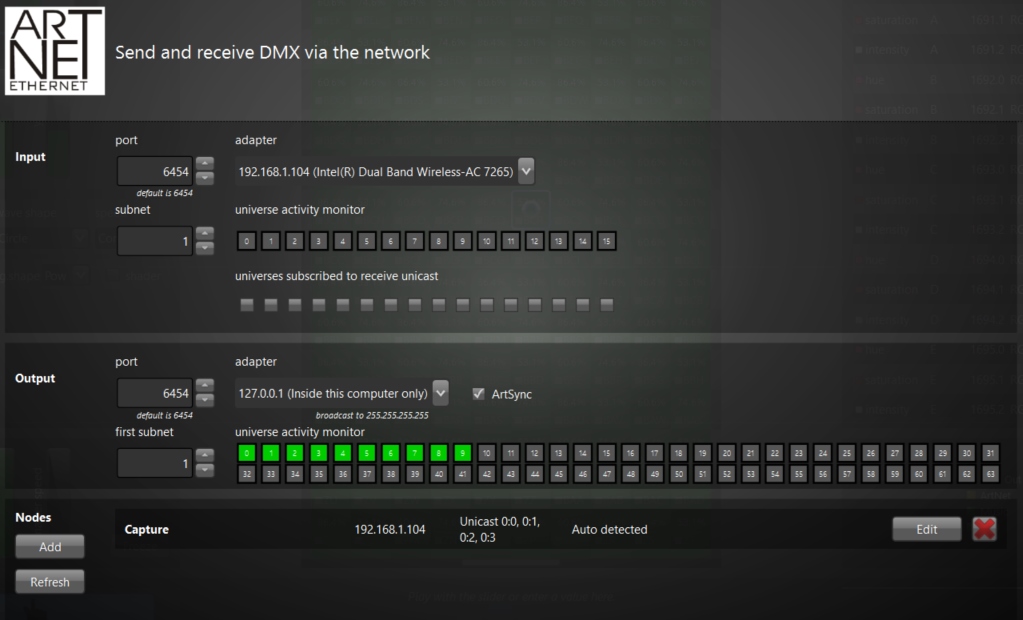
Easily receive commands from other lighting consoles over ArtNET. You can map any DMX values to Lightjams parameters in a few clicks. The ArtNET input panel shows you all DMX addresses at once, and this in real time.
Wireless Network (WIFI) Optimized
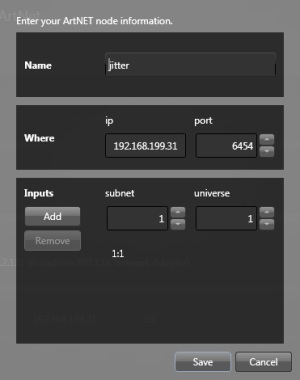
When using a wireless network to transmit ArtNET data, you absolutely need to use the unicast feature (sending ArtNET to specific IP addresses). The reason is that broadcasting very rapidly overloads a wireless network. With ArtNET and Lightjams, you'll be able to send data directly to the nodes you want and get great performance even when sending multiple universes.
Affordable ArtNet to DMX
You can use the really affordable DMXKing eDMX1 to get the DMX to your lights for under $150.

ArtNET Good Citizen
Lightjams supports all ArtNET versions from 1 to 4. It plays really well with other DMX lighting consoles and respects the ArtNET specifications.